Manage users
Tenant administrators manage organization users from the Users card.
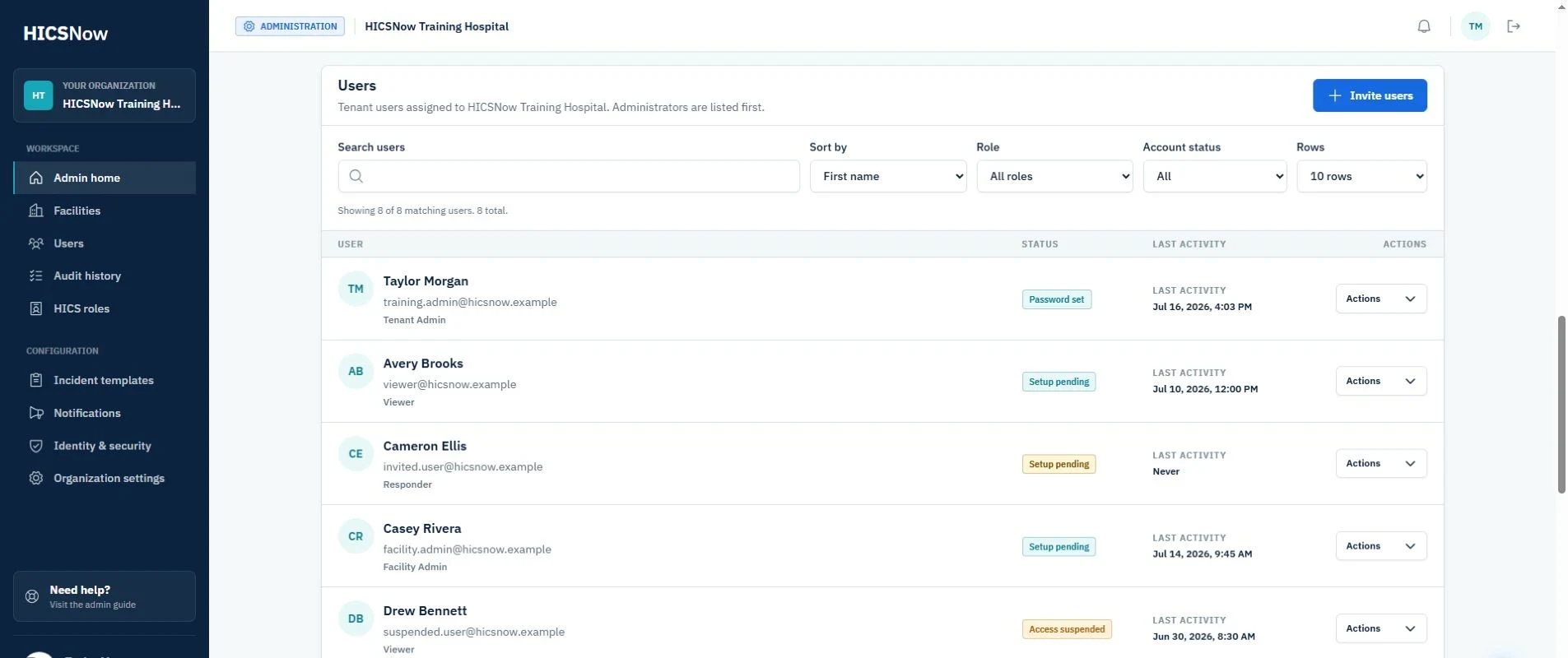
Find and review users
Use the available controls to:
- Search as you type.
- Sort by first or last name.
- Filter by user group.
- Filter by account status.
- Choose how many rows are displayed.
Select a user row to view that person's profile. The profile view lists the user's facility assignments and provides the same appropriate actions available from the row's Actions menu.
Invite a user
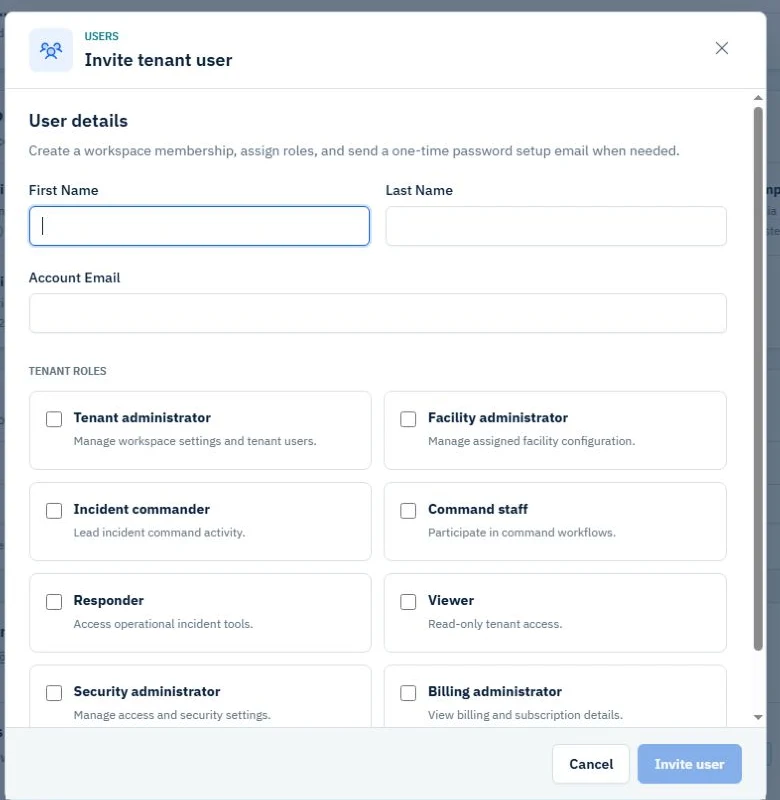
- Select Invite users from the tenant dashboard.
- Enter the user's first name, last name, and account email.
- Select a user group.
- When an organizational assignment is required or desired, select the health system, one or more facilities, or both under Organizational assignments.
- If you select any facilities, choose one as the user's Primary facility.
- If you select both the health system and at least one facility, choose the health system or Primary facility as the user's Primary organization.
- Select Invite user.
All fields begin blank, and no user group is selected by default. HICSNow keeps Invite user unavailable until the required fields and user group are complete. In a Professional or Enterprise workspace, a User may belong to the health system, one or more facilities, or both. A Facility Administrator must remain assigned to at least one facility. A Tenant Administrator may be invited without an organizational assignment because that user group already has organization-wide administrative access.
The user receives a one-time setup link that expires after 24 hours.
Edit permissions
Use Edit permissions to manage organizational assignments and user groups separately from the person's profile information.
Manage organizational assignments
In a Professional or Enterprise workspace, a User may be assigned to the health system, one or more facilities, or both. A system-only User does not appear on a facility roster and does not receive facility access from the system assignment. A Facility Administrator must be assigned to at least one facility and have exactly one Primary facility.
Organizational assignments are optional for a Tenant Administrator. Removing every assignment does not remove or narrow that person's organization-wide administrative access. Add an assignment when the organization wants to record the administrator's normal organizational or operational context.
Whenever facilities are selected, Primary facility identifies the user's default facility context. When both the system and facilities are selected, Primary organization identifies whether the health system or primary facility is the user's default organizational context. These selections do not expand the user's permissions. Before a primary facility is deactivated, assign another active primary facility to every affected user who will retain access through an additional facility.
- Open the user's Actions menu or select the user row to open the profile.
- Select Edit permissions.
- Select Manage facilities.
- Under Organizational assignments, select the health system, one or more facilities, or both.
- If you select any facilities, choose one as the Primary facility.
- If both types of assignment are selected, choose the health system or Primary facility as the Primary organization.
- Select Save.
The profile displays each assignment and identifies the primary organizational context. A Tenant Administrator with no assignments can still administer the organization and every facility. Changing organizational assignments does not send another invitation, reset the user's password, or create another user account.
Assignments identify where a user belongs. Facility assignments determine facility rosters, while a health-system assignment establishes system context without granting facility access. The user's assigned user group continues to control the administrative actions available in the workspace.
Manage user groups
- Open the user's Actions menu or select the user row to open the profile.
- Select Edit permissions.
- Select User groups.
- Choose the tenant-wide user group:
- User allows facility-specific groups to be configured.
- Tenant Administrator applies tenant-wide and administers every facility. It hides the facility-level group controls because no additional facility group can be assigned.
- When User is selected, choose User or Facility Administrator independently for each assigned facility.
- Select Save.
A person can therefore be a Facility Administrator for one facility and a User at another facility. The facility detail roster and the user's facility assignments display the applicable group for each facility.
A system-only User has no facility-specific group until a facility assignment is added.
A Tenant Administrator always inherits administrative access to every facility. HICSNow does not retain separate User or Facility Administrator groups for that membership while tenant-wide access is active.
Operational HICS Roles are separate from these application-administration user groups. Use Edit HICS Roles to maintain health-system or facility-specific HICS Role assignments. See Manage HICS Roles.
A Tenant Administrator cannot change their own user group. Another Tenant Administrator or the HICSNow owner must make that change. This prevents an administrator from accidentally removing their own tenant-wide administrative access.
Manage invitation status
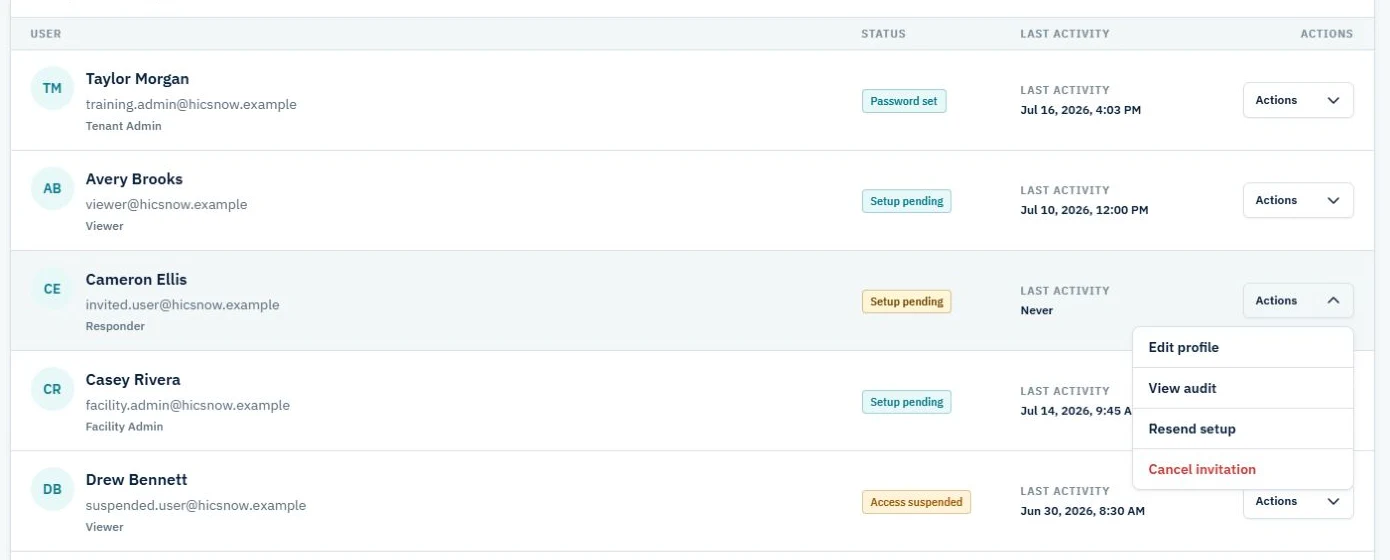
For a user with Setup pending status:
- Select Resend setup to issue a new 24-hour setup link. Any previous unused setup link for that membership becomes unavailable.
- Select Cancel invitation when the person should no longer establish access.
After the current 24-hour link expires, the user card changes to Setup expired. Select Resend setup to issue a new link; the status returns to Setup pending until that new link is completed or expires.
Canceling an invitation invalidates its active setup link and changes the membership to a canceled state. It preserves the user record and audit history rather than deleting historical activity.
Manage an active user
Authorized actions may include:
- View profile.
- Edit profile.
- View user audit history.
- Send password reset.
- Edit permissions.
- Deactivate user.
Deactivate user immediately revokes that user's active tenant sessions and changes the membership to Access suspended without deleting the user or historical activity. If the user is a facility contact, HICSNow lists the affected facilities before confirmation and retains each contact assignment with the same Access suspended wording.
Use Reactivate user to restore an eligible suspended membership. The user can then sign in again with the existing account credentials.
HICSNow rejects a deactivation that would leave an organization without at least one active tenant administrator. Assign and activate another tenant administrator before retrying the action.