Set up your password
When an administrator invites you to HICSNow, you receive a one-time password setup link.
Before you begin
- The link expires after 24 hours.
- The link can be used only once.
- If the link expires or has already been used, ask an administrator to send a new setup invitation.
Create your password
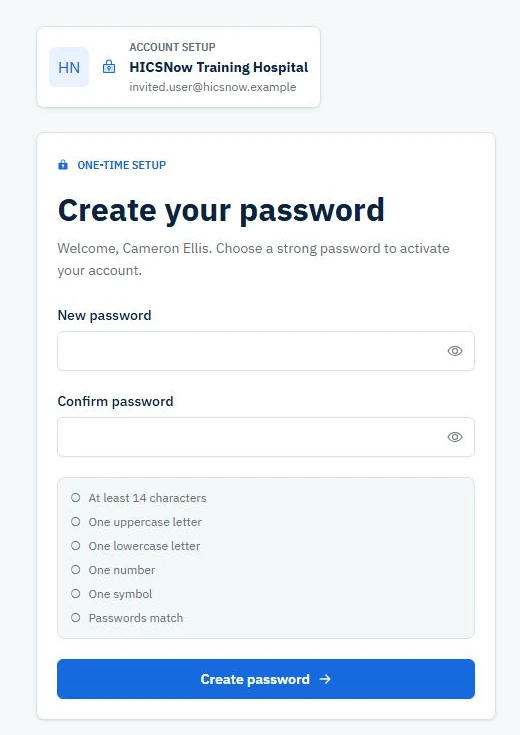
- Open the setup link in your invitation email.
- Enter a new password.
- Confirm the new password.
- Review the on-screen password requirement indicators.
- Select Create password.
Your password must contain:
- At least 14 characters.
- One uppercase letter.
- One lowercase letter.
- One number.
- One symbol.
The confirmation entry must exactly match the new password. HICSNow displays real-time feedback as each requirement is met.
After setup succeeds, use the displayed login link to access your workspace.
Keep setup links private
Do not forward or share a password setup link. If you believe someone else accessed the link, ask an administrator to send a replacement.